
 Posted By
Bajarangi soft ,
Posted On 05-10-2020
Posted By
Bajarangi soft ,
Posted On 05-10-2020
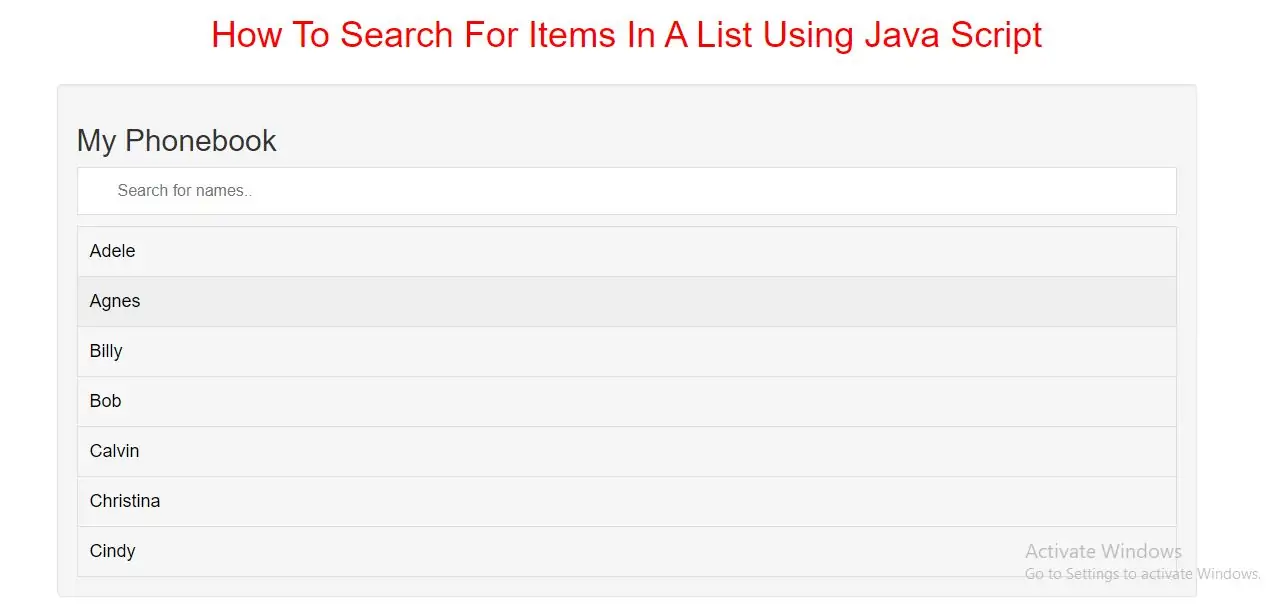
Create A Search List
Step 1: Create index.html file and implement below code in it.
<input type="text" id="Input" onkeyup="seacrh()" placeholder="Search for names.." title="Type in a name">

<ul id="UL">
    <li><a href="#">Adele</a></li>
    <li><a href="#">Agnes</a></li>

    <li><a href="#">Billy</a></li>
    <li><a href="#">Bob</a></li>

    <li><a href="#">Calvin</a></li>
    <li><a href="#">Christina</a></li>
    <li><a href="#">Cindy</a></li>
</ul>
Note: We use href="#" in this demo since we do not have a page to link it to. In real life this should be a real URL to a specific page.
Step 2:Now we create css code for list of items so implement below code in index.html file
Style the input element and the list:
<style>
    * {
        box-sizing: border-box;
    }

    #Input {
        width: 100%;
        font-size: 16px;
        padding: 12px 20px 12px 40px;
        border: 1px solid #ddd;
        margin-bottom: 12px;
    }

    #UL {
        list-style-type: none;
        padding: 0;
        margin: 0;
    }

    #UL li a {
        border: 1px solid #ddd;
        margin-top: -1px; /* Prevent double borders */
        background-color: #f6f6f6;
        padding: 12px;
        text-decoration: none;
        font-size: 18px;
        color: black;
        display: block
    }

    #UL li a:hover:not(.header) {
        background-color: #eee;
    }
</style>
<script>
    function seacrh() {
        var input, filter, ul, li, a, i, txtValue;
        input = document.getElementById("Input");
        filter = input.value.toUpperCase();
        ul = document.getElementById("UL");
        li = ul.getElementsByTagName("li");
        for (i = 0; i < li.length; i++) {
            a = li[i].getElementsByTagName("a")[0];
            txtValue = a.textContent || a.innerText;
            if (txtValue.toUpperCase().indexOf(filter) > -1) {
                li[i].style.display = "";
            } else {
                li[i].style.display = "none";
            }
        }
    }
</script>
<!DOCTYPE html>
<html>
<head>
    <title>How To Search For Items In A List Using Java Script</title>
    <meta charset="utf-8">
    <meta name="viewport" content="width=device-width, initial-scale=1">
    <link rel="stylesheet" href="https://maxcdn.bootstrapcdn.com/bootstrap/3.4.1/css/bootstrap.min.css">
</head>
<style>
    h1{
        color:red;
    }
    * {
        box-sizing: border-box;
    }

    #Input {
        background-position: 10px 12px;
        background-repeat: no-repeat;
        width: 100%;
        font-size: 16px;
        padding: 12px 20px 12px 40px;
        border: 1px solid #ddd;
        margin-bottom: 12px;
    }

    #UL {
        list-style-type: none;
        padding: 0;
        margin: 0;
    }

    #UL li a {
        border: 1px solid #ddd;
        margin-top: -1px; /* Prevent double borders */
        background-color: #f6f6f6;
        padding: 12px;
        text-decoration: none;
        font-size: 18px;
        color: black;
        display: block
    }

    #UL li a:hover:not(.header) {
        background-color: #eee;
    }
</style>
<body>
<div class="container">
    <br>
    <br>
    <div class="text-center">
        <h1>How To Search For Items In A List Using Java Script</h1>
    </div>
    <br>
        <div class="well">

            <h2>My Phonebook</h2>

            <input type="text" id="Input" onkeyup="seacrh()" placeholder="Search for names.." title="Type in a name">

            <ul id="UL">
                <li><a href="#">Adele</a></li>
                <li><a href="#">Agnes</a></li>

                <li><a href="#">Billy</a></li>
                <li><a href="#">Bob</a></li>

                <li><a href="#">Calvin</a></li>
                <li><a href="#">Christina</a></li>
                <li><a href="#">Cindy</a></li>
            </ul>

            <script>
                function seacrh() {
                    var input, filter, ul, li, a, i, txtValue;
                    input = document.getElementById("Input");
                    filter = input.value.toUpperCase();
                    ul = document.getElementById("UL");
                    li = ul.getElementsByTagName("li");
                    for (i = 0; i < li.length; i++) {
                        a = li[i].getElementsByTagName("a")[0];
                        txtValue = a.textContent || a.innerText;
                        if (txtValue.toUpperCase().indexOf(filter) > -1) {
                            li[i].style.display = "";
                        } else {
                            li[i].style.display = "none";
                        }
                    }
                }
            </script>
        </div>
    <div>
</body>
</html>