
 Posted By
Bajarangi soft ,
Posted On 08-10-2020
Posted By
Bajarangi soft ,
Posted On 08-10-2020
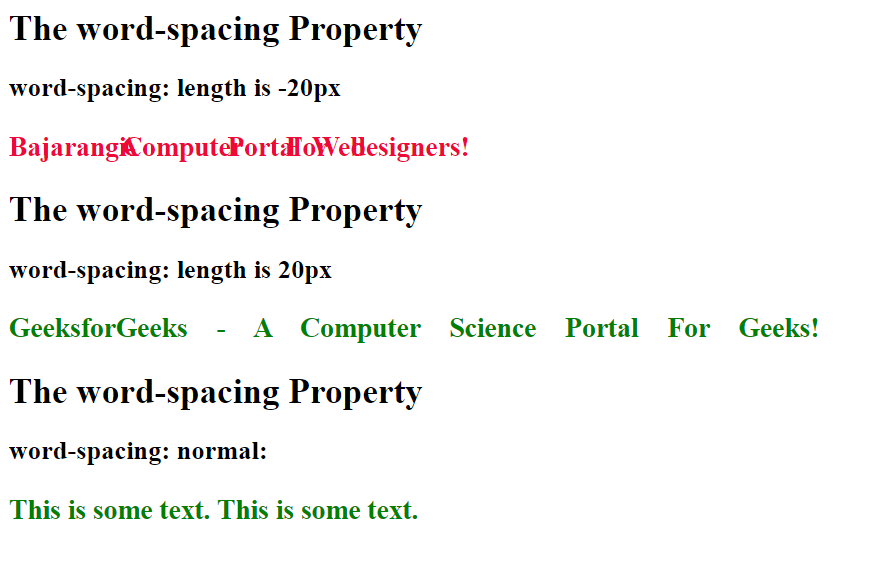
It is a CSS property to increases or decreases the white space between words. This property can have only two values, they are normal and length.
Syntax:
word-spacing: normal|length|initial|inherit;
Property values:
<!DOCTYPE html>
<html>
<head>
    <title>
        CSS | word-spacing Property
    </title>
</head>
<body>
<h1>The word-spacing Property</h1>

<h2>word-spacing: normal:</h2>
<p style=" word-spacing: normal;
color:green;
font-weight:bold;
font-size:25px;">
    This is some text. This is some text.
</p>
</body>

</html>
<!DOCTYPE html>
<html>
<head>
    <title>
        CSS | word-spacing Property
    </title>
</head>
<body>
<h1>The word-spacing Property</h1>

<h2>word-spacing: length is 20px</h2>
<p style=" word-spacing:20px;
color:green;
font-weight:bold;
font-size:25px;">
    GeeksforGeeks - A Computer Science Portal For Geeks!
</p>
</body>

</html>
<!DOCTYPE html>
<html>
<head>
    <title>
        CSS | word-spacing Property
    </title>
</head>
<body>
<h1>The word-spacing Property</h1>

<h2>word-spacing: length is -20px</h2>
<p style=" word-spacing:-20px;
            color:#ee0937;
            font-weight:bold;
            font-size:25px;">
    Bajarangi- A Computer Portal For Web designers!
</p>
</body>

</html>
Supported browsers: The browsers supported by word-spacing Property are listed below: