
 Posted By
Bajarangi soft ,
Posted On 30-10-2020
Posted By
Bajarangi soft ,
Posted On 30-10-2020
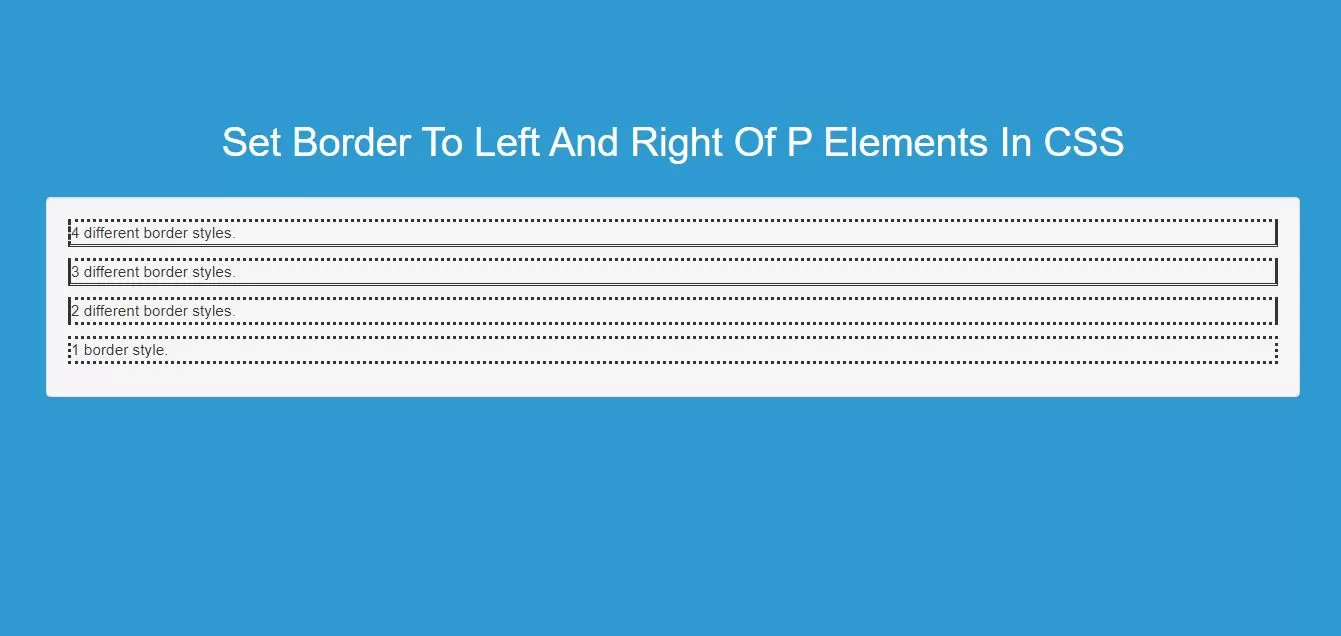
Step 1:Create index.html file and implement as below code in it.
<p class="four">4 different border styles.</p>
<p class="three">3 different border styles.</p>
<p class="two">2 different border styles.</p>
<p class="one">1 border style.</p>
<style>
    body {
    background: #2e9ad0;
    }
    /* Four values */
    p.four {
        border-style: dotted solid double dashed;
    }

    /* Three values */
    p.three {
        border-style: dotted solid double;
    }

    /* Two values */
    p.two {
        border-style: dotted solid;
    }

    /* One value */
    p.one {
        border-style: dotted;
    }
</style>
<!DOCTYPE html>
<html>
<head>
    <title>How To Set Border To Left And Right Of P Elements In CSS</title>
    <script src="https://ajax.googleapis.com/ajax/libs/jquery/3.1.0/jquery.min.js"></script>
    <link rel="stylesheet" href="https://maxcdn.bootstrapcdn.com/bootstrap/3.3.6/css/bootstrap.min.css"/>
    <script src="https://maxcdn.bootstrapcdn.com/bootstrap/3.3.7/js/bootstrap.min.js"></script>
</head>
<style>
    body {
    background: #2e9ad0;
    }
    /* Four values */
    p.four {
        border-style: dotted solid double dashed;
    }

    /* Three values */
    p.three {
        border-style: dotted solid double;
    }

    /* Two values */
    p.two {
        border-style: dotted solid;
    }

    /* One value */
    p.one {
        border-style: dotted;
    }
</style>
<body>
<br/><br/>
<div class="container">
    <br><br><br>
    <div class="text-center">
        <h1 id="color" style="color: white;">Set Border To Left And Right Of P Elements In CSS</h1>
    </div>
    <br>
    <div class="well">
        <p class="four">4 different border styles.</p>
        <p class="three">3 different border styles.</p>
        <p class="two">2 different border styles.</p>
        <p class="one">1 border style.</p>
    </div>
    <br>
</div>
</body>
</html>