
 Posted By
Bajarangi soft ,
Posted On 05-10-2020
Posted By
Bajarangi soft ,
Posted On 05-10-2020
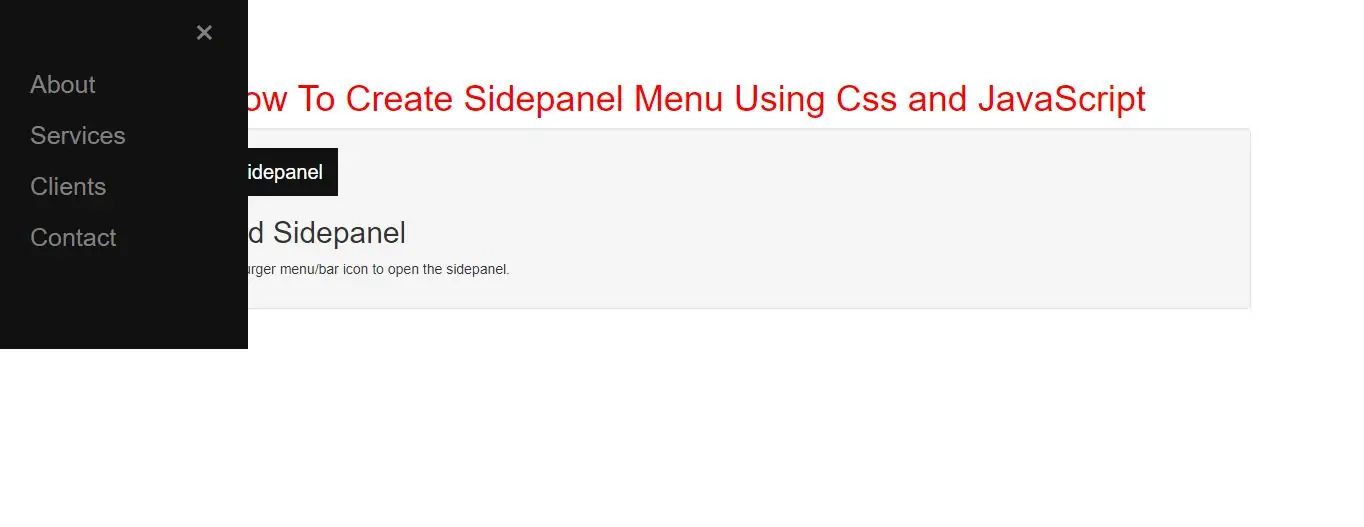
Create a Collapsed Sidepanel
Step 1: Create index.html file and implement below code in it.
<div id="mySidepanel" class="sidepanel">
    <a href="javascript:void(0)" class="closebtn" onclick="closeNav()">×</a>
    <a href="#">About</a>
    <a href="#">Services</a>
    <a href="#">Clients</a>
    <a href="#">Contact</a>
</div>

<div class="text-center">
    <h1>How To Create Sidepanel Menu Using Css and JavaScript</h1>
</div>
<div class="well">
    <button class="openbtn" onclick="openNav()">☰ Toggle Sidepanel</button>
    <h2>Collapsed Sidepanel</h2>
    <p>Click on the hamburger menu/bar icon to open the sidepanel.</p>
</div>
Step 2:Now we create css code to display side panel menu so implement below code in index.html file.
<style>
    h1{
        color: red;
    }
    body {
        font-family: "Lato", sans-serif;
    }

    .sidepanel  {
        width: 0;
        position: fixed;
        z-index: 1;
        height: 350px;
        top: 0;
        left: 0;
        background-color: #111;
        overflow-x: hidden;
        transition: 0.5s;
        padding-top: 60px;
    }

    .sidepanel a {
        padding: 8px 8px 8px 32px;
        text-decoration: none;
        font-size: 25px;
        color: #818181;
        display: block;
        transition: 0.3s;
    }

    .sidepanel a:hover {
        color: #f1f1f1;
    }

    .sidepanel .closebtn {
        position: absolute;
        top: 0;
        right: 25px;
        font-size: 36px;
    }

    .openbtn {
        font-size: 20px;
        cursor: pointer;
        background-color: #111;
        color: white;
        padding: 10px 15px;
        border: none;
    }

    .openbtn:hover {
        background-color:#444;
    }
</style>
<script>
    function openNav() {
        document.getElementById("mySidepanel").style.width = "250px";
    }

    function closeNav() {
        document.getElementById("mySidepanel").style.width = "0";
    }
</script>
Complete Code For Creating Sidepanel Menu Using Css and JavaScript
<!DOCTYPE html>
<html>
<head>
    <title>How To Create Sidepanel Menu Using Css and JavaScript</title>
    <meta charset="utf-8">
    <meta name="viewport" content="width=device-width, initial-scale=1">
    <link rel="stylesheet" href="https://maxcdn.bootstrapcdn.com/bootstrap/3.4.1/css/bootstrap.min.css">
</head>
<style>
    h1 {
        color: red;
    }

    body {
        font-family: "Lato", sans-serif;
    }

    .sidepanel {
        width: 0;
        position: fixed;
        z-index: 1;
        height: 350px;
        top: 0;
        left: 0;
        background-color: #111;
        overflow-x: hidden;
        transition: 0.5s;
        padding-top: 60px;
    }

    .sidepanel a {
        padding: 8px 8px 8px 32px;
        text-decoration: none;
        font-size: 25px;
        color: #818181;
        display: block;
        transition: 0.3s;
    }

    .sidepanel a:hover {
        color: #f1f1f1;
    }

    .sidepanel .closebtn {
        position: absolute;
        top: 0;
        right: 25px;
        font-size: 36px;
    }

    .openbtn {
        font-size: 20px;
        cursor: pointer;
        background-color: #111;
        color: white;
        padding: 10px 15px;
        border: none;
    }

    .openbtn:hover {
        background-color: #444;
    }
</style>

<body>
<div class="container">
    <br>
    <br>
    <br>

    <div id="mySidepanel" class="sidepanel">
        <a href="javascript:void(0)" class="closebtn" onclick="closeNav()">×</a>
        <a href="#">About</a>
        <a href="#">Services</a>
        <a href="#">Clients</a>
        <a href="#">Contact</a>
    </div>

    <div class="text-center">
        <h1>How To Create Sidepanel Menu Using Css and JavaScript</h1>
    </div>
    <div class="well">
        <button class="openbtn" onclick="openNav()">☰ Toggle Sidepanel</button>
        <h2>Collapsed Sidepanel</h2>
        <p>Click on the hamburger menu/bar icon to open the sidepanel.</p>
    </div>

    <script>
        function openNav() {
            document.getElementById("mySidepanel").style.width = "250px";
        }

        function closeNav() {
            document.getElementById("mySidepanel").style.width = "0";
        }
    </script>
    <div>
</body>
</html>