
 Posted By
Bajarangi soft ,
Posted On 01-10-2020
Posted By
Bajarangi soft ,
Posted On 01-10-2020
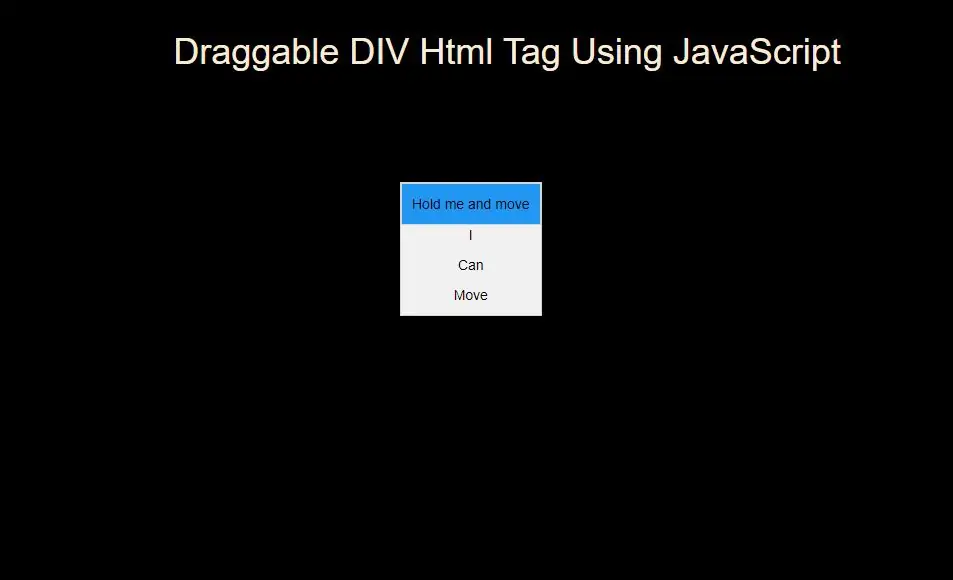
Example(1)
<script>
    //Make the DIV element draggagle:
    dragElement(document.getElementById("div"));

    function dragElement(elmnt) {
        var pos1 = 0, pos2 = 0, pos3 = 0, pos4 = 0;
        if (document.getElementById(elmnt.id + "header")) {
            /* if present, the header is where you move the DIV from:*/
            document.getElementById(elmnt.id + "header").onmousedown = dragMouseDown;
        } else {
            /* otherwise, move the DIV from anywhere inside the DIV:*/
            elmnt.onmousedown = dragMouseDown;
        }

        function dragMouseDown(e) {
            e = e || window.event;
            e.preventDefault();
            // get the mouse cursor position at startup:
            pos3 = e.clientX;
            pos4 = e.clientY;
            document.onmouseup = closeDragElement;
            // call a function whenever the cursor moves:
            document.onmousemove = elementDrag;
        }

        function elementDrag(e) {
            e = e || window.event;
            e.preventDefault();
            // calculate the new cursor position:
            pos1 = pos3 - e.clientX;
            pos2 = pos4 - e.clientY;
            pos3 = e.clientX;
            pos4 = e.clientY;
            // set the element's new position:
            elmnt.style.top = (elmnt.offsetTop - pos2) + "px";
            elmnt.style.left = (elmnt.offsetLeft - pos1) + "px";
        }

        function closeDragElement() {
            /* stop moving when mouse button is released:*/
            document.onmouseup = null;
            document.onmousemove = null;
        }
    }
</script>
<!DOCTYPE html>
<html>
<head>
    <title>How To Create Draggable DIV Html Tag Using JavaScript</title>
    <meta charset="utf-8">
    <meta name="viewport" content="width=device-width, initial-scale=1">
    <link rel="stylesheet" href="https://maxcdn.bootstrapcdn.com/bootstrap/3.4.1/css/bootstrap.min.css">
</head>
<style>
    body{
        background: black;
        color: antiquewhite;
    }
    #div {
        position: absolute;
        z-index: 9;
        background-color: #f1f1f1;
        text-align: center;
        border: 1px solid #d3d3d3;
        color: black;
    }

    #divheader {
        padding: 10px;
        cursor: move;
        z-index: 10;
        background-color: #2196F3;
        color: black;border: 1px solid #d3d3d3;

    }
</style>
<body>
<div class="container">
    <br>
    <br>
    <div class="text-center">
        <h1> Draggable DIV Html Tag Using JavaScript</h1>
    </div>
    <br>
        <div id="div">
            <div id="divheader">Hold me and move</div>
            <p>I</p>
            <p>Can</p>
            <p>Move</p>
        </div>
    <div>
</body>
</html>
<script>
    //Make the DIV element draggagle:
    dragElement(document.getElementById("div"));

    function dragElement(elmnt) {
        var pos1 = 0, pos2 = 0, pos3 = 0, pos4 = 0;
        if (document.getElementById(elmnt.id + "header")) {
            /* if present, the header is where you move the DIV from:*/
            document.getElementById(elmnt.id + "header").onmousedown = dragMouseDown;
        } else {
            /* otherwise, move the DIV from anywhere inside the DIV:*/
            elmnt.onmousedown = dragMouseDown;
        }

        function dragMouseDown(e) {
            e = e || window.event;
            e.preventDefault();
            // get the mouse cursor position at startup:
            pos3 = e.clientX;
            pos4 = e.clientY;
            document.onmouseup = closeDragElement;
            // call a function whenever the cursor moves:
            document.onmousemove = elementDrag;
        }

        function elementDrag(e) {
            e = e || window.event;
            e.preventDefault();
            // calculate the new cursor position:
            pos1 = pos3 - e.clientX;
            pos2 = pos4 - e.clientY;
            pos3 = e.clientX;
            pos4 = e.clientY;
            // set the element's new position:
            elmnt.style.top = (elmnt.offsetTop - pos2) + "px";
            elmnt.style.left = (elmnt.offsetLeft - pos1) + "px";
        }

        function closeDragElement() {
            /* stop moving when mouse button is released:*/
            document.onmouseup = null;
            document.onmousemove = null;
        }
    }
</script>